
Your premium supplier of DTF prints in Western Australia
With over 10 years of experience in the industry, we are committed to providing outstanding service.
How to use and achieve professional results using our premium DTF transfers

Step by Step How to Apply DTF
Follow these steps for successful Dtf transfers.

What you need

Step 1
Pre press garment for 5sec at 165c
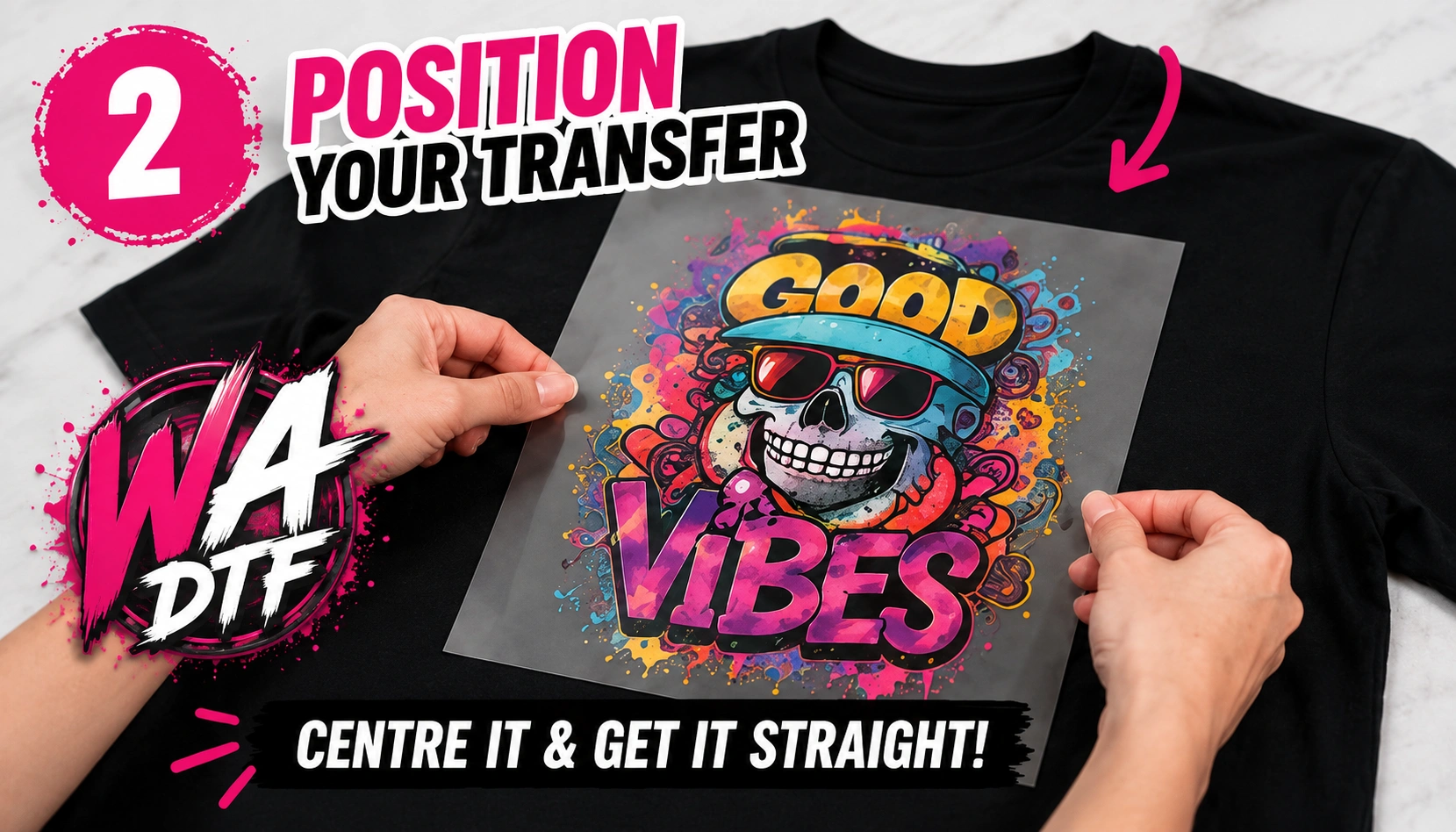
Step 2
Position Dtf transfer on shirt, pro-tip heat press a fold down the centre of shirt for perfect alignment
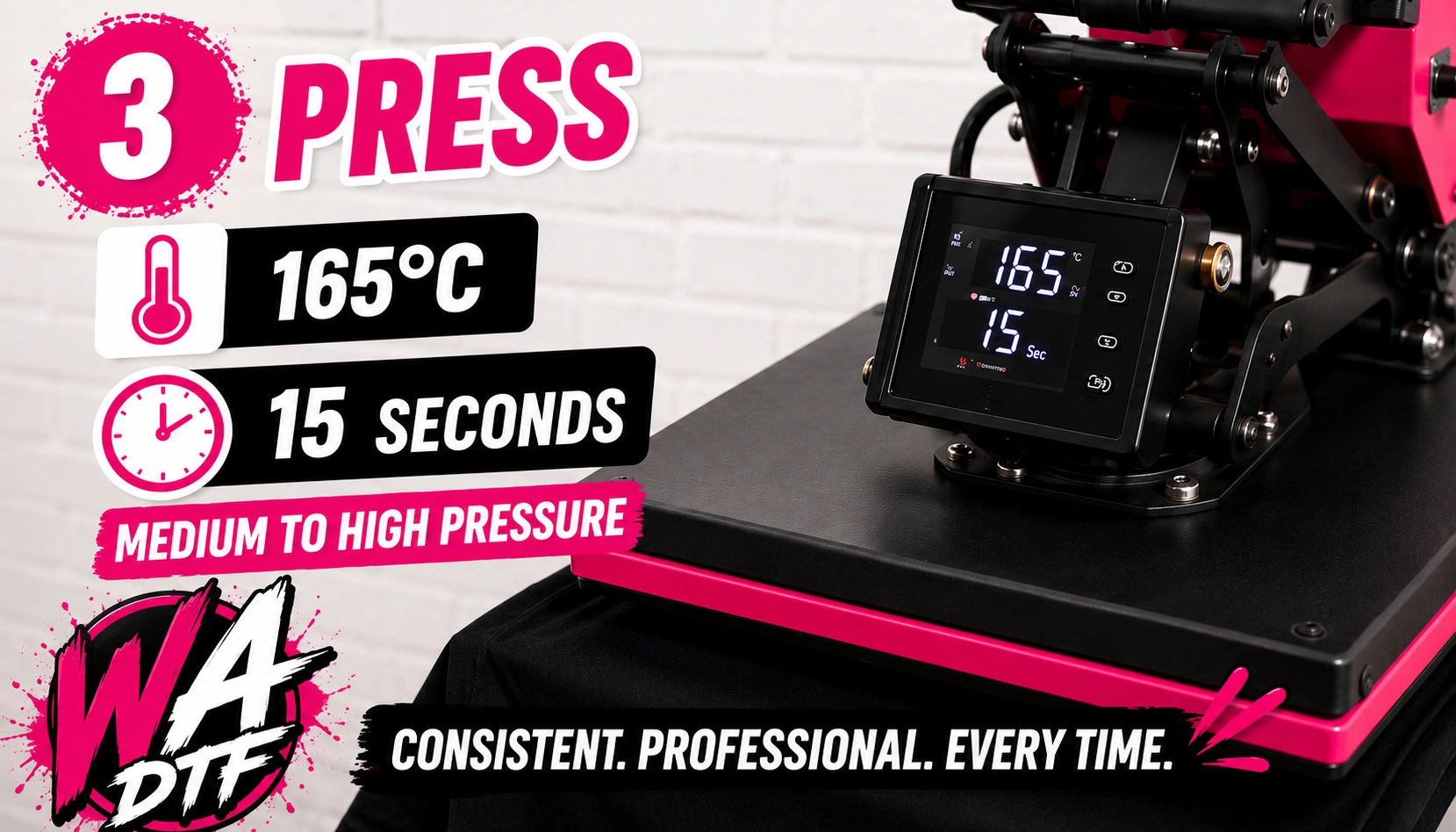
Step 3
Press for 15sec at 165c at medium to high pressure using a professional heatpress for best results

Step 4
Hot or cold peel our film. Please wear heat proof gloves doing this

Step 5
2nd press for 5-10sec for maximum adhesion with a parchment sheet over the top

Follow these steps for professional finish every time

Order Your Gang Sheets here
Upload your designs here
Straight into our gang sheet builder
Our Textile DTF printer does 58cm wide prints and our UV DTF printer soon to come is a 30cm wide printer
Printing Services we provide
We offer a full range of printing services, including DTF, Sublimation, Vinyl, finished apparel and promotional items. We understand the importance of quality, and our services are designed to ensure the integrity for your custom needs.
Vinyl Stickers
High-quality custom vinyl stickers printed in Australia. Waterproof, durable, and available in any shape or size.
DTF ( Textile )
A DTF (Direct to Film) Textile Gang Sheet is a single, large sheet of transfer film containing multiple custom designs, logos, or graphics arranged together to be printed in one batch. It is a highly efficient method used by apparel printers to optimize space, reduce material waste, and lower production costs by "ganging" multiple artworks into one print run.
Our inks and powders do have DTF (Direct-to-Film) ECO PASSPORT certification from OEKO-TEX®
UV DTF
A UV DTF Gang Sheet is a high-efficiency printing method that allows you to arrange multiple custom designs, logos, or stickers onto a single, large sheet of film. These designs are printed using UV-cured inks, providing durable, vibrant, and scratch-resistant decals that can be applied to hard, non-porous surfaces like tumblers, glass, metal, and plastic without heat or pressure
Finished Apparel
Premium Custom DTF Apparel: Vibrant, Durable, & Ready-to-Wear Elevate your brand with high-definition Direct to Film (DTF) printing. We deliver premium custom apparel and merchandise, featuring vibrant colors, sharp details, and a soft, flexible finish that lasts. Ideal for cotton, polyester, blends, and sportswear, our versatile DTF process ensures wash-resistant, non-cracking results on nearly any fabric.
Vibrant, Full-Color Designs: Perfect for intricate graphics and logos.
Durable & Flexible: Professional, wash-resistant finish.
Versatile Fabric Application: Works on cotton, poly, blends, and more.
Low Minimum Orders: Custom, on-demand service.
Sublimation Printing
High-resolution sublimation printing for apparel, sportswear, and promotional items. Using heat-activated inks, we infuse designs into polyester fabrics and polymer-coated surfaces, ensuring a smooth, breathable, and durable finish. In A4 and A3 sheets.
Printed all in house using epson photo quality printer and Japanese made IZUMI sublimation ink and paper, for top quality prints.
Please mirror your image before submitting
Our latest work/projects
Dtf Gang Sheet Printing

Finished Apparel

Custom Printed Shirts

Workwear
Your premium supplier of DTF prints in Western Australia
Our prints are all done in house to the highest quality using premium materials.
Our inks and powders do have DTF (Direct-to-Film) ECO PASSPORT certification from OEKO-TEX®
Contact Us
FAQ
Basic Questions and Answers bellow
Direct-to-roll (or direct-to-fabric) textile printing is a digital printing method where ink is sprayed directly onto a continuous roll of fabric, rather than onto transfer paper or individual garments. It works like a large inkjet printer, providing high-resolution designs, vivid colors, and fast production for fashion and home textiles.
Key Aspects of Direct-to-Roll Printing:
Process: The fabric is typically pre-treated for ink absorption, printed, and then passed through a drying or heat-curing unit to fix the ink.
Fabric Versatility: It works on a wide variety of materials, including cotton, polyester, and silk, making it highly versatile for different applications.
Best For: Large-scale,, continuous, or custom printing needs, such as fashion, apparel, home decor (cushions, curtains), and soft signage.
Advantages:
High Quality: Capable of printing intricate details and complex color gradients.
Efficiency: Faster production as it prints on a continuous roll rather than one item at a time.
Sustainability: Digital, on-demand printing often results in less waste than traditional, conventional printing methods
Online Gang Sheet Builder
The Online Gang Sheet Builder is an innovative tool designed to simplify the printing workflow for custom designs. It allows users to combine multiple artworks onto a single sheet efficiently. This not only reduces material waste but also saves time during production. Gang sheets are widely used in DTF, DTG, and screen printing, as they enable multiple designs to be printed in one pass.
The platform is user-friendly and accessible from any device with internet access. It caters to both beginners and professionals, making layout creation faster and more accurate. By optimizing sheet usage, businesses can increase production efficiency and maintain high-quality results consistently.
Key Features Online Gang Sheet Builder
Drag-and-Drop Interface: Easily position artwork on the sheet without manual measurement.
Customizable Sheet Sizes: Adjust dimensions to match the printer or heat press specifications.
Multiple Artwork Support: Combine various designs of different sizes on one sheet.
Real-Time Preview: Visualize the final layout before printing to avoid mistakes.
Material Optimization: Maximize sheet use and reduce ink, film, and substrate waste.
Export Options: Save layouts in compatible file formats for printing equipment.
These features make the online gang sheets builder an essential tool for modern print shops.
Step-by-Step Instructions
1. Sign Up and Log In
Start by creating an account or logging in. An account lets you save projects, access previous layouts, and manage multiple sheets efficiently.
2. Select Sheet Size
Choose the correct sheet dimensions based on your printer or heat press. Standard sizes are available, along with custom options for specific production requirements.
3. Upload Artwork
Upload your designs in formats like PNG, JPG, or SVG. Ensure that the resolution and color profiles are appropriate for the printing method used.
4. Arrange Designs
Drag and drop uploaded designs onto the sheet. Resize, rotate, and reposition as necessary. Alignment grids and snapping tools help maintain spacing and consistency.
5. Preview Layout
Use the preview feature to check placement. Ensure no overlaps unless intended and leave enough margin for cutting or pressing.
6. Optimize for Production
The builder often suggests optimal placement to minimize waste. Review these suggestions and make adjustments as needed.
7. Export for Printing
Once the layout is complete, export the sheet in a compatible file format such as PDF, PNG, or TIFF. High resolution ensures quality prints.
Benefits of Using an Online Gang Sheets Builder
Time-Saving: Quickly arrange multiple designs without trial-and-error.
Cost-Efficient: Optimizes materials to reduce waste.
User-Friendly: Suitable for beginners and experienced users alike.
Error Reduction: Preview prevents mistakes that could lead to wasted prints.
Versatility: Works with DTF, DTG, screen printing, and other methods.
Using a gang sheet builder helps print shops maintain consistent quality and increase workflow efficiency.
Best Practices
Prepare Artwork in Advance: Gather all designs before starting to save time.
Leave Adequate Margins: Ensure enough space between designs for cutting or pressing.
Use High-Resolution Files: Prevents pixelation or blurring in the final print.
Group Similar Sizes: Improves material utilization and simplifies layout.
Save Frequently: Avoid losing progress during editing.
Applications
The online gang sheet builder is suitable for:
Custom Apparel: T-shirts, hoodies, hats, and other garments.
Promotional Items: Stickers, decals, and small merchandise prints.
Bulk Orders: Streamlines production of large quantities of small designs.
Design Proofing: Preview layouts before printing to ensure accuracy.
Its versatility supports both small custom businesses and larger commercial operations.
Conclusion
The Online Gang Sheets Builder is an essential tool for modern printing workflows. It streamlines the arrangement of multiple designs on a single sheet, saving time, reducing material waste, and increasing efficiency. With its intuitive interface, real-time previews, and export options for various file formats, the tool guarantees high-quality results. Whether for small-scale custom projects or large-volume production, the online gang sheet builder helps businesses produce professional outputs while maximizing resources.
Pressing Instructions
General Pressing Instructions (suitable most fabrics including 100% cotton & most cotton blends): 1) Set heat press to 150°C and use firm pressure (between 60-80 psi) 2) Press for 8-10 seconds 3) Hot peel, i.e. peel off film immediately after pressing in a swift and flat motion 4) Second press for a further 8-10 seconds 5) Should you notice any glue residue, press again using greaseproof paper to lift excess glue While not compulsory, we recommend the use of a teflon sheet for each press. Pressing Instructions for Delicates / Polyester / Sublimated Garments: As above, but reduce temperature to 120-130°C, use medium pressure (40-60 psi) and shorter press duration (5-6 seconds). Lower temperatures and pressure can help reduce the risk of dye migration, scorching and press marks on these materials. Important Notes: -Strong & even pressure is the most important factor for successful DTF application. - Ensure pressing surface is flat and avoid pressing over seams, zippers, buttons or thick creases. - These instructions are intended as a general guide only. Heat presses can vary in temperature/pressure/heating consistency and different materials may react differently. We strongly recommend testing on a sample garment before production runs. Final press settings should always be determined based on your own equipment and materials. - Home irons and Cricut-style presses are not recommended, as they often cannot provide the consistent pressure required for reliable results. use at your own risk.
Washing, Drying & Aftercare
Please ensure to adhere to these aftercare instructions to ensure your garments' durability and longevity!
1) Cold / cool wash only
2) Do NOT bleach or add fabric softeners for washing
3) Do NOT dry clean
4) Do NOT tumble dry
5) Do NOT iron prints
6) Do NOT wash within 24 hours of pressing